The Access Registry provides administrators with a comprehensive view of all users who have active access to paid courses. It serves as a central hub for monitoring, validating, and managing enrollment rights that are granted through course purchases, manual assignments, refunds, or administrative adjustments.
The registry displays essential information such as user identity, associated course, access type, activation date, and expiration (if applicable). With powerful search and filtering tools, administrators can quickly locate specific users, audit access records, verify entitlement accuracy, and resolve access-related issues.
This documentation explains how to navigate the Access Registry, interpret access records, manually grant or revoke course access, and troubleshoot common enrollment concerns. By using the Access Registry effectively, administrators can maintain consistent access control, ensure users receive the correct course permissions, and uphold a smooth learning experience across the platform.
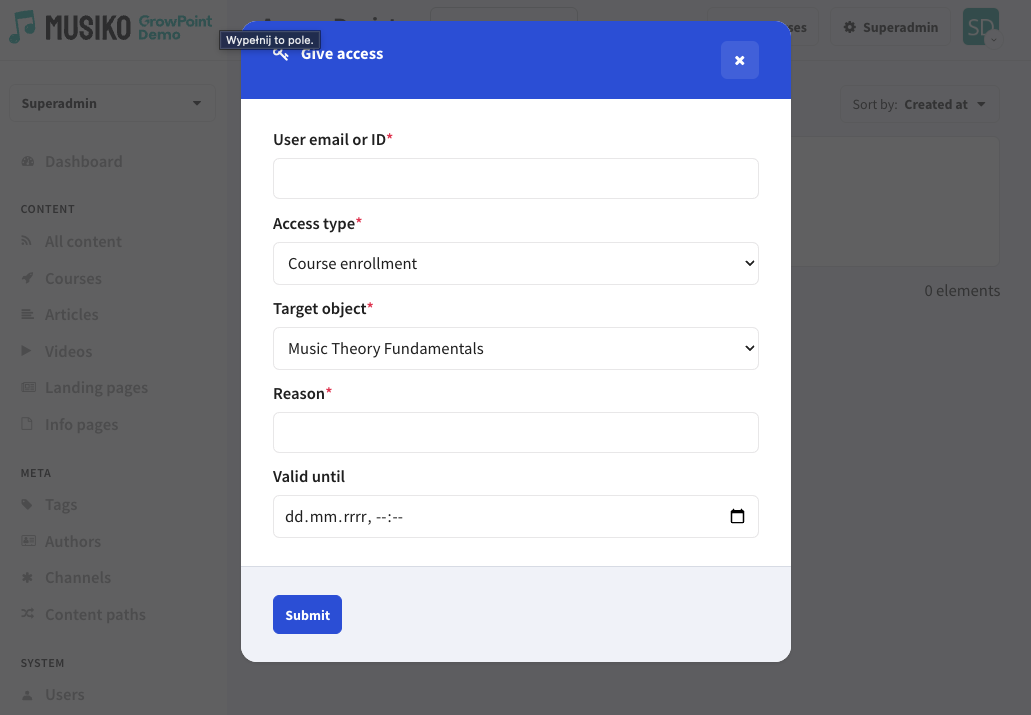
Give access settings page
| User email or ID | Users email or ID |
| Access type | Option of:
|
| Target object | Choice of objects included ( course name, article name ) |
| Reason | Reason of access |
| Valid until | Length of access |